Showing posts with label SEO TIPS. Show all posts

Wednesday, January 9, 2019

CTR – what is CTR of Google ad sense?- What is the Actual CTR for your website?-How can you decrease your CTR of your account?


                     CTR – what is CTR of Google ad sense?

  CTR is the number of division of the number of Page views and the click of the Ads of your page. If your click on ad sense is more than the page views then the CTR will be high.

What is the Actual CTR for your website?

If you want to calculate the CTR and the page view of your page and become more than 10 % then you should have to take an action against it. Because it can be dangerous for your ad sense account. Because more and invalid click can be do your ad sense account’s Disable. If your CTR becomes higher than the actual CTR than you have to decrease the Level of CTR.


How can you decrease your CTR of your account?

If you think that somebody is attacking to your account and getting invalid traffic then you can decrease the limit of the CTR to normal.  If you are getting more invalid click then you can apply for safety from to Google ad sense.  Or you can remove some ads from the home page of the site.
Before you reached to remove the ads from your site you have to know that from where the invalid traffic or clicks are coming. Then if you can see that the traffic are invalid and coming from the post then you have to remove the ads from the posts and for sometimes. If you are using your site in wordpress.com then you can use the plug-in for safety of invalid clicks. But sometimes it does not work for every sites. So you can use the methods which I Described above.  
If these Methods Does not work then you can you can mail to Google for more solution.
How to check the CTR ?


Now flow the Steps- 
           Sign in with the Google Ad-sense Account
what is CTR, CTR limitaion, Danger of CTR, Limitation of CTR, CTR ka khatra, How to decrease CTR, CTR kiya hain?


Now Click on Three Dot in the Right Side
Now click on the Ad Report and Default 
will adsense disable if CTR is More, CTR value in Earning, ctr keise kom rakhe

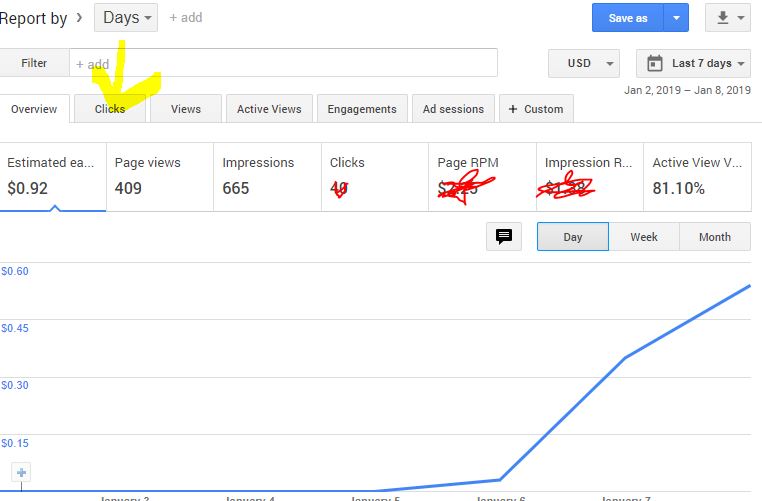
Now click on 'Click' 
How to solve CTR problem? what is CTR problem after adsense


Now click on CTR Then the Ctr Level will Appear.


Wednesday, January 2, 2019

How to Make a option to Upload by Public in Blogger or Any Website- Give allow to public uploading Post

If you want to allow your users to post in your site. Then you can create an option for Uploading the post of Your Users
So you have to capy the code and past in the wedged where you want to Set it up
 for Help how to Use Click the The Link Given below-


Code-

 <script src="https://dl.dropboxusercontent.com/s/htbxax1y39i5oak/guests.js" type="text/javascript"></script>
<script type="text/javascript">
     bkLib.onDomLoaded(function() {
          var myNicEditor = new nicEditor();
          myNicEditor.setPanel('myNicPanel');
          myNicEditor.addInstance('wysiwyg');
     });
</script>
<div class="form-style-6">
<form id="contactform" method="POST">
<input name="name" placeholder="Your name" type="text" />
<input name="_replyto" placeholder="Your email required" required="" type="email" />
<textarea name="Details" placeholder="This is an optional section. You can tell about yourself and post Your social links and site links here." required="" rows="6" style="width: 50%;"></textarea>
<input name="Post_title" placeholder="Post Title (Required)" style="width: 85%;" type="text" />
<h3>
Write Post below</h3>
<div id="myNicPanel" style="width: 83%;">
</div>
<textarea id="wysiwyg" name="message" rows="20" style="background: white; overflow: scroll; width: 85%;"></textarea>
<input name="tags" placeholder="Enter your tags/label/category (optional)" style="width: 85%;" type="text" />
<input name="_gotcha" style="display: none;" type="text" />
<input name="_next" type="hidden" value="http://www.seohome.info" />
<input type="submit" value="Post it for review" />
</form>
<b>

</b> <b>Please, Don't post Spam!, Spams are excluded Automatically.</b></div>
<h2>
Guidelines for guest posting</h2>
<ol>
<li>Guideline no. 1</li>
<li>Guideline no. 2</li>
<li>Guideline no. 3</li>
</ol>
<script>
    var contactform =  document.getElementById('contactform');
    contactform.setAttribute('action', '//formspree.io/yourid@gmail.com');
</script>
<!--Hey don't remove the below link as I worked very hard to make this form with wysiwyg editor and email support. Thank you!-->
<a href="http://www.seohome.info" style=" float: right; "> Add this form </a>

and save the arrangement then refresh the page and enjoy the facilities.

Sunday, September 2, 2018

HOW TO ADD LIVE CHAT OPTION FOR MY BLOG/WEBSITE FOR FREE WITH EASY CODING


HOW TO ADD LIVE CHAT OPTION FOR MY BLOG/WEBSITE FOR FREE WITH EASY CODING


v What is the “live chat”?

                   The live chat is a program by whom you can contact with the owner of the site you visited.
Or if you are a owner of a blog or website, then you can provide the opportunity to your visitor to contact with you very easily and instantly. So the visitor will get help and very highly helpful with your site. So every blogger or the owner of a site he might use the program to live chat.

v Who can use the live chat?
            Live chat is a simple program which can be programmed by the java programming languages in your blog or to your website. So it is no need to think for who are working in another sites. Because everyone can use the chat for free with the help of the JAVA.
So there is nothing to think that who can use the live chat options.

 v HOW CAN USE OR SET UP THE LIVE CHAT IN MY SITE?


I have told that everyone can use and set up the options to use the live chat options before. To design the live chat option you have to know the JAVA. If you don’t know the java then don’t worry. We have designed a simple live chat option. So you have to follow some steps.

note:- read also- How to change the default language in MAPS (Google maps) on Android or in a pc?


Just follow as given bellow-

                                            i.            Open your blogger from blogger.com


                                          ii.            Sign in with your blogger


                                        iii.            Now click on layout as shown in the picture


                                       iv.            Click on add wedget as shown in the photo


                                         v.            Click on HTML/JAVA script


                                       vi.            Copy the code given here –


<script type="text/javascript" async="async" defer="defer" data-cfasync="false" src="https://mylivechat.com/chatinline.aspx?hccid=30783995"></script>


                                     vii.            Past the code on the box of java-


                                   viii.            Now click on save


                                        ix.            Click on save arrangement


 if you have any problem then comment bellow.


Wednesday, August 29, 2018

How to change the default language in MAPS (Google maps) on Android or in a pc? By ajka guide


              How to change the default language in MAPS (Google maps) on Android or in a pc?


           Google map is a very highly recommended application for everyone in today. So everyone should have to know about the Google maps for getting help through the map.
           Google map is a platform where you can upload your environment like- house , market, bridge, pump etc. you can get help about an unknown place to get direction of that places, roads, etc. whenever you need. So if you want to go to a place, then you can search the road and other environmental situation.
The user can use the satellite, which has provided by Google map.

Ø Features of google map-

ü It provides a live map in online and offline


ü You can use a satellite in this map

ü You can use share your location with your friend and family

ü Google map shows you the duration you want to go to that place

ü It provides some other features as traffics, public transit bicycling, satellite, train etc.

ü Google provides you to upload your nearest market and your houses and other pictures

ü It provides you points for uploading the pictures, with that point you can shop online.

Ø The default languages setting for this map-

                      There are so many languages to set up as default languages.
To change the default languages you have to flow some steps, which has given bellow –
v Open google map


v Click on the three dot (given in the right side as shown in the pictures)

v Go to bellow

v Click on the setting


v Click on navigation setting


v Now select your languages in the option given “voice selection”


Ø If you want to change the font languages then flow the options-

o   Go to setting


o   Go to languages & input


o   Click on languages

o   Select the languages you want to choose


Ø HOW TO SHARE LOCATION WITH FRIEND OR FAMILLY –

v Open google map

v Click on the three dot (given in the right side as shown in the pictures)

v Go to bellow

v Click on location sharing


v Click on get started

v Choose option whom want to share your location ( by which way like facebook, whatsapp etc.)

v Choose the contact you want to share
         
           if you have any confuse then comment bellow we will help your quistion.

 * note- only important pictures has given for your guidline.


Monday, May 28, 2018

Top 13 latest secret code for all Android user || secret code for android device by DIGITAL HELP

             Top 13 latest secret code for all Android user || secret code for android device by DIGITAL HELP


                 What is secret code 
Secret code are some useful code for android,pc,tablet etc.
Secret code can be different for some mobile phone, but some works for all user . 
In this post i am going to show you more than 13 secrEt code for android phone .
Through this code you will able to work properly by your device .
To know about a android device you might know the the secret code for android mobile.
If you don't know about secret code , then you don't know about a device . Because the secret code is the main program of your device, so iam going to show you about more than 10 secret code for your android device. 

Q. What can i do with the secret codes ? 
Ans. Through a code you can do the basic poits of your android.
Q.what types of code can be for a android phone?
Ans.  Secret code can be as *#3774843*##* ( this is a semple)


                                  What are the secret code for android and what does it work ?   

            See also about - playstore secret trick and hidden features 

1. Enable caller identification by dialing *#30#*
2. stop out going calls by dialing *33*# ( start again with #33*pin#) 
3.  Instead bettery saving by *#*#7780#*#*
4. Whole apps reinstallation by * 2767*3855#


5. Better comunication *3370#
6. Listen yourself by *#*#8351#*#*
7. Cervice centre number by *#5005*7672# (ipHONE)
8. Quit turning off *#*#7594#*#*
9. Call waiting on by *43# 
             Call waiting off by #43#
10. Quick sevice menu by *#0011# (samsung)
11. Signal information by *3001312345#*
12. Strait voice mail by *#21#
13. Hide your phone number by #31#
                                       So this are the best secret feture for all android .